





Web Tricks and Tips...

I am Gunaseelan. I started this blog to share my tips and tricks about all i.e computer trick, internet trick, seo updates, seo tips, ethical hacking tips etc...

Reiciendis voluptatibus maiores

SEO Updates...

This is the page about new SEO updates daily and also shared with some tips and techniques...

Asumenda omnis dolor

Designing...

Here we share the tips for desiging of html, xml and other some too...

Voluptates repudiandae sint

Necessitatibus saepe ev...

Please share and give your suggesstions...

Necessitatibus saepe eveniet

Omnis dolor repellendus...

At vero eos et accusamus et iusto odio dignissimos ducimus qui blanditiis praesentium voluptatum deleniti atque corrupti...

Omnis dolor repellendus

Pomnis voluptas assumen...

At vero eos et accusamus et iusto odio dignissimos ducimus qui blanditiis praesentium voluptatum deleniti atque corrupti...

Pomnis voluptas assumenda

Harum quidem rerum...

At vero eos et accusamus et iusto odio dignissimos ducimus qui blanditiis praesentium voluptatum deleniti atque corrupti...

Harum quidem rerum
  • Reiciendis voluptatibus maiores
  • Asumenda omnis dolor
  • Voluptates repudiandae sint
  • Necessitatibus saepe eveniet
  • Omnis dolor repellendus
  • Pomnis voluptas assumenda
  • Harum quidem rerum

Earn Money By Online

Friday, 14 September 2012

How to Hide Your Private Folder


To learn carnatic music online visit : ilearncarnaticmusic.com
 

Hello Friends, this is a simple trick to hide some folder for your private files, but this is not the step by any batch programming. Just follow the steps:

Step 1 : Create a folder in any drive on your computer and copy your private files to that folder.

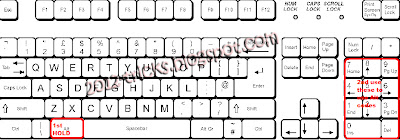
Step 2 : Right click that folder and select “Rename” then hold “Alt” key and type “0160” (don’t release alt key till the four letter typed “ALT + 0160”) .

Its only working on num keyboar guys please note this
how to hide folder


Step 3: Then right click the folder and select “Properties” from that dialog box go to customize tab.

Step 4: Now click “Change Icon” and select the empty icon in the list(that is available in 13th column of the list).


Now check that folder is in hide state. Please look at this video for clear instruction.

Posted by Gunaseelan 3 comments

Thursday, 30 August 2012

How to auto login in Window 7


Hello friends, today the post is to automatically login in to your computer without asking the user login page. That means you can have more than one user in your computer but you usually use only one account daily means you can set that account as auto login so that you need not to login every time you switch on your computer. Here are the steps:

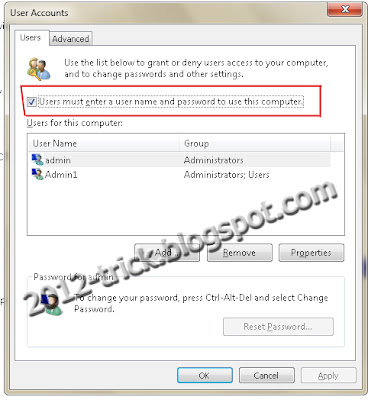
Step 1: Login into your account and then click “Start” menu and then type “Netplwiz” and press Enter.

Step 2: A User account box will appear, which shows the user names of your computer. 


Step 3: Then click the name of the username which is to auto login. And then uncheck the box above the ser name “Users must enter a username and password to use this computer” then press “OK”.

Step 4: Then it will ask you username and password. After enter username and password click “Ok”.

Computer tips and tricks - Gunaseelan SEO


Step 5: To check restart your computer, it will not ask you the login credentials.


See this video to see the steps visually


Author Bio: I am Gunaseelan – SEO Analyst in Chennai. I am doing SEO in last 2 years for some niche sites and get ranking well. Nowadays our team getting a stepping stone ORM projects. See my facebook profile here: http://www.facebook.com/gunaseelanbaabin
Posted by Gunaseelan 6 comments

Wednesday, 1 August 2012

How to Use Pendrive as Key for PC

Hello Friends, this is the post to show how to use pendrive as a login key for your PC. This is more secure because you dont want to remember your password. Just insert your pendrive and you can login to your PC. You cant start your PC without that pendrive. I show your the trick in this video Please watch it and enjoy. Thank You.

Posted by Gunaseelan 1 comments

Tuesday, 31 July 2012

How to hide a drive on from my computer

Hello friends, today we are going to discuss about hiding a drive from computer.

Why we have to do this?

In our home all our friends and family members can use our computer. So its not a safe environment for your personal files. So we have to hide that from them. After doing this trick the specified partition is hidden from my computer and nobody knows there is one another partition there. So you can use that partition for your own personal only.

How to do this?

Step 1: Open run prompt ( windows key + R)

Step 2: Type gpedit.msc and hit enter, a group policy window will appear.

Step 3: From that window just open the following path:

User Configuration ==> Administrative Templates  ==>  Windows Components  ==>  Windows Explorer

refer the image

hide a drive on from my computer - Gunaseelan


  (select windows explorer root folder and see the list in the right site)

Step 4: From that list double click “Hide these specified drives in My Computerand then you will get a new window.

Step 5: In that window select the enable option at top and then select the drive which you have to hide from others. And then click apply and then ok.

hide a drive on from my computer - Gunaseelan


Now go to My Computer and check that the selected drive is hidden.

Again to view that drive do the same steps and at last select disable in the above picture.


(NOTE: If the drive still not hidden means just restart your computer and check that will be hide)

Posted by Gunaseelan 0 comments

Monday, 30 July 2012

Enjoy Facebook With Images


Hello Friends, Hope you are all fine and me too. Today I am going to show you some facebook trick to chat or comment with some built in images in facebook.

Step 1: Login to facebook.
Facebook Tricks - Gunaseelan
Facebook Magic

Step 2: Copy any code below and paste it in facebook chat or comments and see the magic. 


    [[126216480723638]]
  [[126125527399400]]    
  [[126216220723664]]  
  [[126133150731971]]  
  [[126229700722316]]  
  [[126261164052503]]  

Thank you for watching this blog guys. Soon i will post my next blog. 
Posted by Gunaseelan 3 comments
Powered by Blogger.